Coupons: Overview
↑ Back to topWooCommerce comes with built-in coupon creation and management tools. WooCommerce core offers fixed-cart, fixed-product, and percentage-based coupons. On this page you’ll learn how to:
- Activate coupons in your store.
- Create a coupon.
- Set “Usage Restrictions” and “Usage Limits” for coupons.
Activating Coupons in WooCommerce
↑ Back to topBefore creating your first coupon, you’ll need to enable coupon use in your store. Enable coupons by following these instructions:
- Navigate to: WooCommerce > Settings > General > Enable coupons
- Tick the checkbox to Enable the use of coupon codes.
- Save Changes.
(More info at: Configuring WooCommerce – General options.)
Creating/Adding a Coupon in WooCommerce
↑ Back to topThe first step to offering coupons to your customers is to create a coupon. Follow these instructions to create a coupon in WooCommerce:
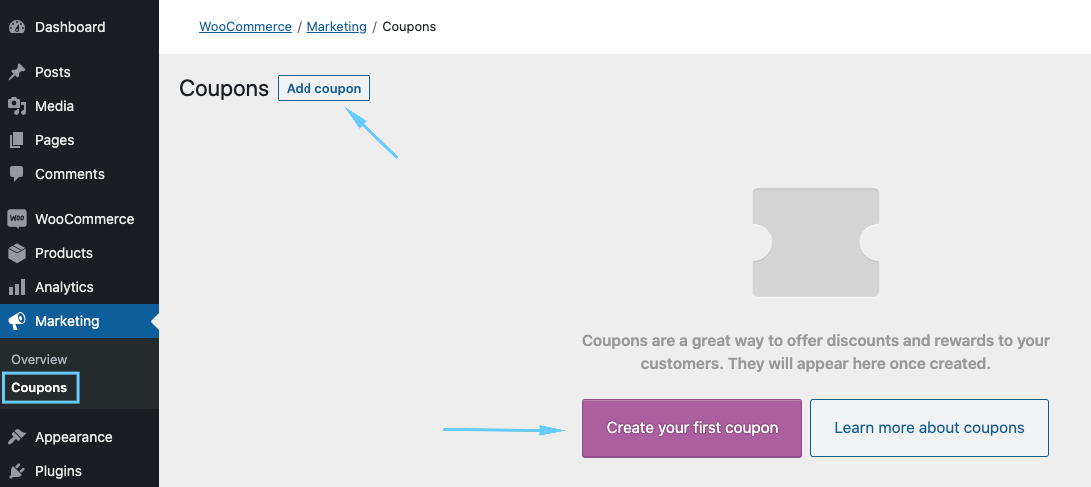
- Navigate to: Marketing >Coupons.
- If you’ve never made a coupon before, you’ll initially see a screen with a button to create a coupon and a button to learn more about coupons.
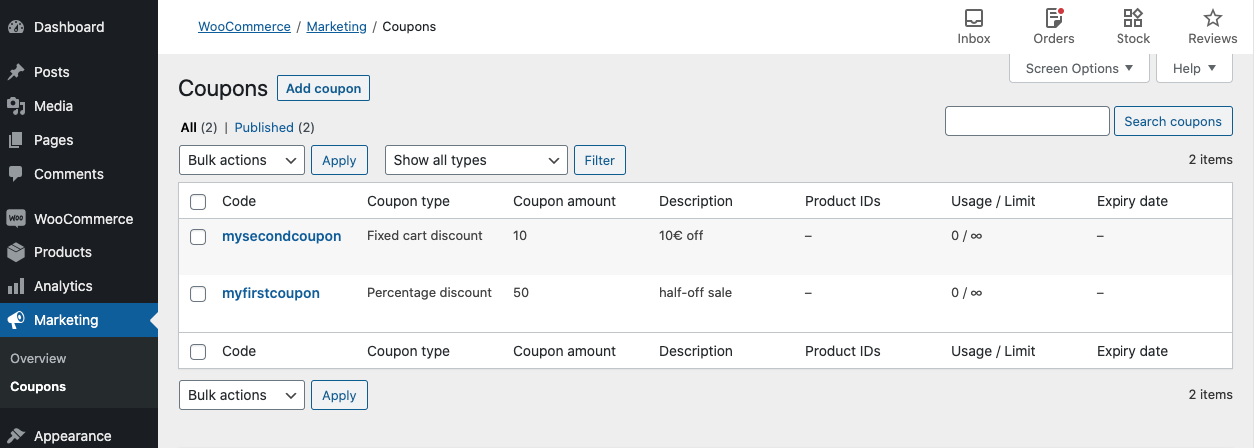
- If you’ve made a coupon previously, you will see the “coupons” menu.
- If you’ve never made a coupon before, you’ll initially see a screen with a button to create a coupon and a button to learn more about coupons.
- Create a new coupon by clicking the Add Coupon button at the top. of the screen.
- Enter or generate a Coupon Code. Customers use this code on the cart/checkout pages to apply the discount. You have two options for generating a code:
- Create/Enter a code – Enter an alphanumeric code in the Coupon Code Field. Coupons are not case sensitive
- Generate a Random Code – Select the Generate Coupon Code button if you want WooCommerce to auto-create and enter a coupon code via algorithm.
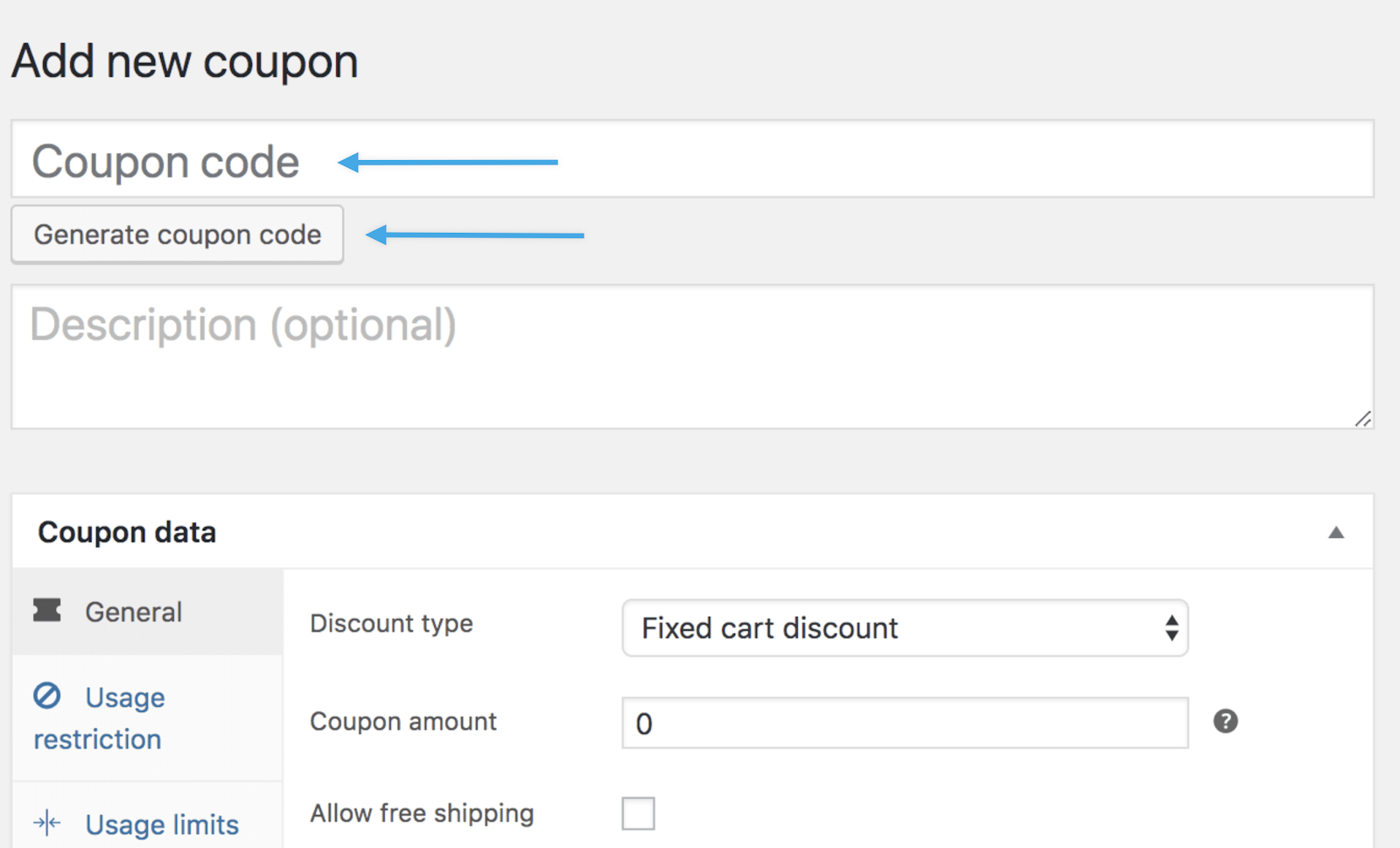
- Enter a Description (optional). This is information about the coupon for internal use (not seen by customers) like name of promotion/event, dates the coupon is valid, ticket number, customer name, etc.
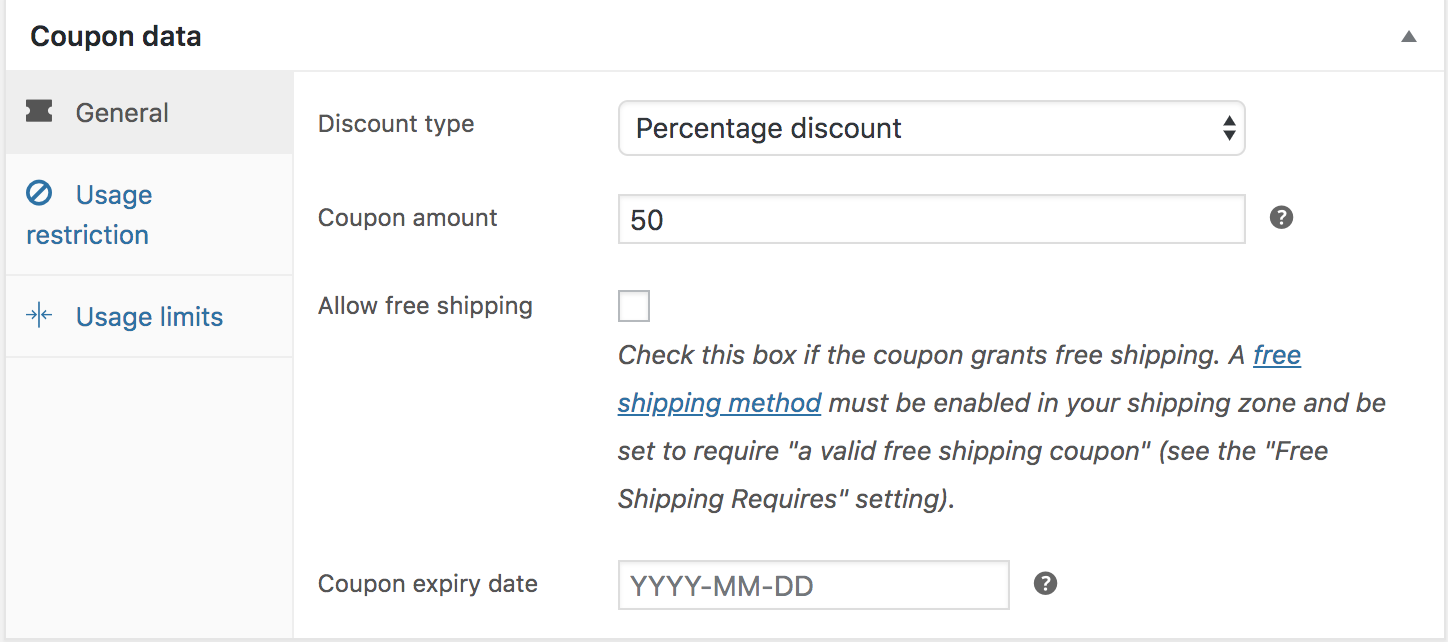
- Select the “Discount Type” from the dropdown menu. There are three choices:
- Percentage discount – A percentage discount for selected products only. For example, if the cart contains three (3) t-shirts @ $20 each = $60, a coupon for 10% off applies a discount of $6.
- Fixed cart discount – A fixed total discount for the entire cart. For example, if the cart contains three (3) t-shirts @ $20 each = $60, a coupon for $10 off gives a discount of $10.
- Fixed product discount – A fixed total discount for selected products only. Customers receive a set amount of discount per item. For example, three (3) t-shirts @ $20 each with a coupon for $10 off applies a discount of $30.
- Enter the coupon amount. Enter the amount without currency (i.e. : $ , £ ) or percent ( %) signs regardless of the discount type you chose in the previous step. If you want to offer a discount of 10%, you’ll enter `10` in the field.
- Check the box for “Allow Free Shipping” if applicable. You use this box when creating a “free shipping” coupon to use with the free shipping method. You can learn more about this option here.
- Set a coupon expiry date (optional). Coupons expire/cannot be used on the date that is set.
- Click the “Publish” button on the right hand side if you do not need to add any usage restrictions or usage limits (covered in the next section).
Setting Coupon Usage Restrictions and Usage Limits
↑ Back to topCoupons have two other settings tabs used for the configuration of coupons: Usage Restrictions and Usage Limits. Below, we provide detailed descriptions of each of the options in these tabs.
Configuring Coupon Usage Restrictions
↑ Back to topIn the usage restrictions menu are options to restrict the use of the coupon to certain cart totals, products, and customers. Below, we describe each type of restriction that you can apply to a coupon:
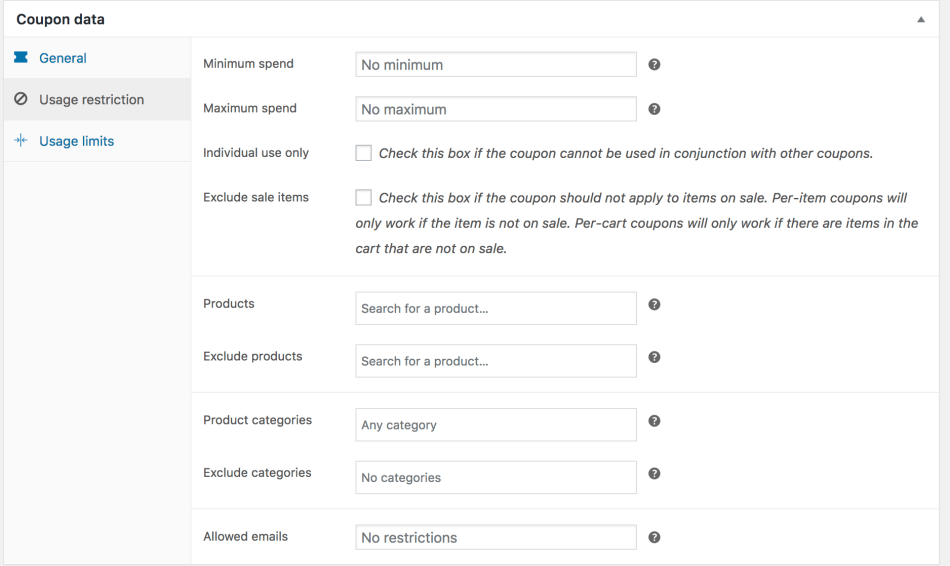
- Minimum spend – Set the minimum subtotal needed to use the coupon. Note: WooCommerce uses the sum of cart subtotal + tax to determine the minimum amount.
- Maximum spend – Set the maximum subtotal allowed when using the coupon.
- Individual use only – Tick the box if the coupon cannot be used in combination with other coupons.
- Exclude sale items – Tick the box if the coupon does not apply to products on sale. Per-cart coupons don’t work when a sale item is added afterward.
- Products – The coupon can be applied to these specific products, or these products must be in the cart for the coupon discount to apply.
- Exclude products – You cannot apply the coupon to these specific products, or these products cannot be in the cart for the coupon discount to apply.
- Product categories – The coupon applies to only these categories or requires specific categories in the cart for the discount to apply.
- Exclude categories – The coupon does not apply to these categories, or specific categories must not be in the cart for the coupon discount to apply.
- Allowed Emails/Email restrictions – These are email addresses that can use a coupon. Verified against customer’s billing email. WooCommerce also allows you to include a wildcard character (*) to match multiple email addresses, for example, `*@gmail.com` would allow any @gmail.com email address to use the coupon.
Configuring Coupon Usage Limits
↑ Back to topUsage limits specify how many times customers can use a coupon. There are three ways to limit coupon usage:
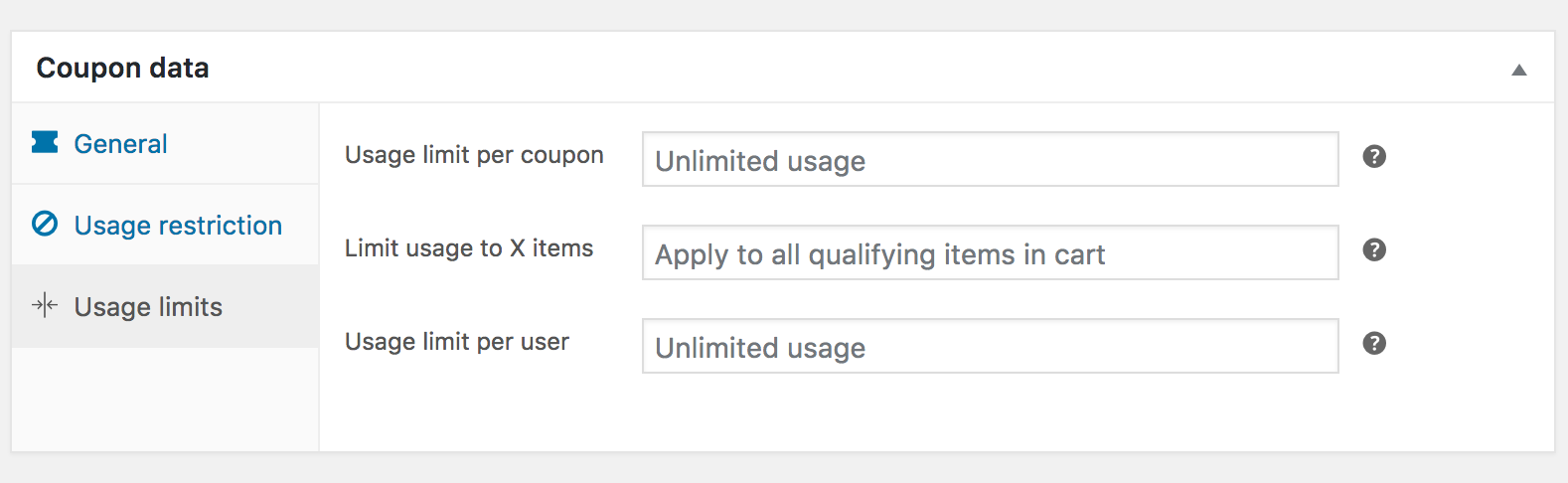
- Usage limit per coupon – Each coupon has a usage limit indicating how many times all customers can use it before it becomes invalid.
- Limit usage to X items – Customers can apply the coupon to a maximum of X items before it becomes invalid. Note: This field only works if specific products are added to the
productsfield in “Usage Restrictions”. - Usage limit per user – Each customer can use the coupon a certain number of times before it becomes invalid specifically for that customer.
Once you’ve configured all settings, select Publish and your coupon is ready to use.
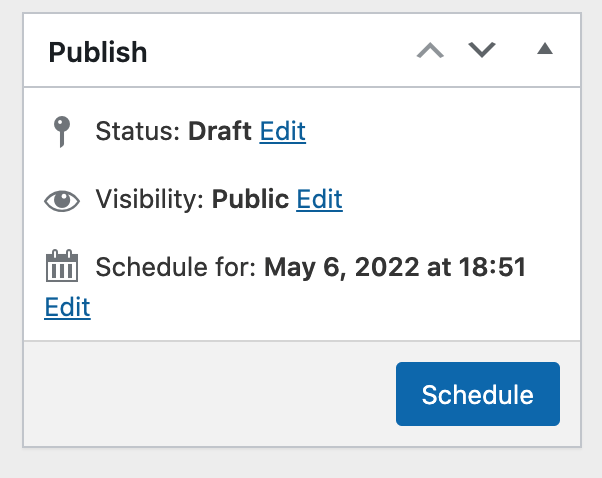
If you do not want the coupon to be immediately available, you can schedule it to become available on a future date/time using the option in the Publish settings:
Sending a coupon
↑ Back to topCustomers must add coupon codes to their cart or at checkout to receive the coupon discount. There is no functionality in WooCommerce core to automatically apply coupon codes for customers so you need to send them via email, social media, or other marketing methods. If you are looking for ways to boost your store’s marketing campaigns and send coupons via emails to your customers, check out these two plugins to extend WooCommerce:
- AutomateWoo – Both an email marketing tool and an automation tool. You can use it to send out coupons to customers after they reach certain spend amounts in your store or after their first purchase.
- MailPoet – An email marketing plugin that helps you boost sales. Send coupons to users through a variety of different email templates (Welcome emails, order emails, etc).
Applying a coupon
↑ Back to topCustomers apply coupon codes on the cart/checkout pages by clicking the “Add Coupon” link. They then enter the coupon into the box and click “Apply” to add the discount to their order.
Customers see an error message appear indicating why the coupon cannot be applied if it is not valid..(i.e. When a coupon expires).
Store managers can add coupons to manually created orders by clicking the “Apply coupon” button at the bottom of the order details. Store managers can also apply a coupon to an “unpaid” customer order by navigating to the “edit order” screen for the customer’s order and clicking the “Apply Coupon” button at the bottom of the screen.
Here are a few important notes about coupon discounts and how they are applied:
- Taxes: Coupons apply to product prices before tax calculation to ensure accurate tax calculation, preventing rounding errors by splitting the discount between each product in the cart. This behavior is more noticeable with Fixed Cart Discounts.
- Shipping: Coupons do not affect shipping since they can only apply to cart items. Shipping is not a cart item. Therefore, if a customer has a coupon covering the entire cost of the products in their cart but your store charges a $10 shipping fee, they will still pay the $10 shipping fee. The only exception is when you create a coupon for free shipping.

Advanced Configuration: Can I customize the Generate Coupon Code function?
↑ Back to topYes, if you are a developer, it’s possible to customize the JS-driven Generate Coupon Code functionality by specifying length of code, and add a prefix and/or suffix. The Core team intentionally excluded characters that could be ambiguous or difficult to read.
Questions and Support
↑ Back to topDo you still have questions and need assistance?
This documentation is about the free, core WooCommerce plugin for which support is provided in our community forums on WordPress.org. Searching there you’ll often find that your question has been asked and answered before.
If you haven’t created a WordPress.org account to use the forums, here’s how.
- If you’re looking to extend the core functionality shown here, we recommend reviewing available extensions in the Woo Marketplace.
- Need ongoing advanced support, or a customization built for WooCommerce? Hire a WooExpert agency.
- Are you a developer building your own WooCommerce integration or extension? Check our Developer Resources.
If you weren’t able to find the information you need, please use the feedback thumbs below to let us know! 🙏