- Showcase your product images and descriptions while finalizing prices, stock or payment gateway setups
- Toggle product visibility on a product, category, user role or user location basis
- Change text used on regular WooCommerce “Add to Cart” buttons when Catalog Visibility is active
- Switch between an active online store and a static product catalog
Installation
↑ Back to top- Download the .zip file from your WooCommerce account.
- Go to: WordPress Admin > Plugins > Add New and Upload Plugin with the file you downloaded with Choose File.
- Install Now and Activate the extension.
Setup and Configuration
↑ Back to top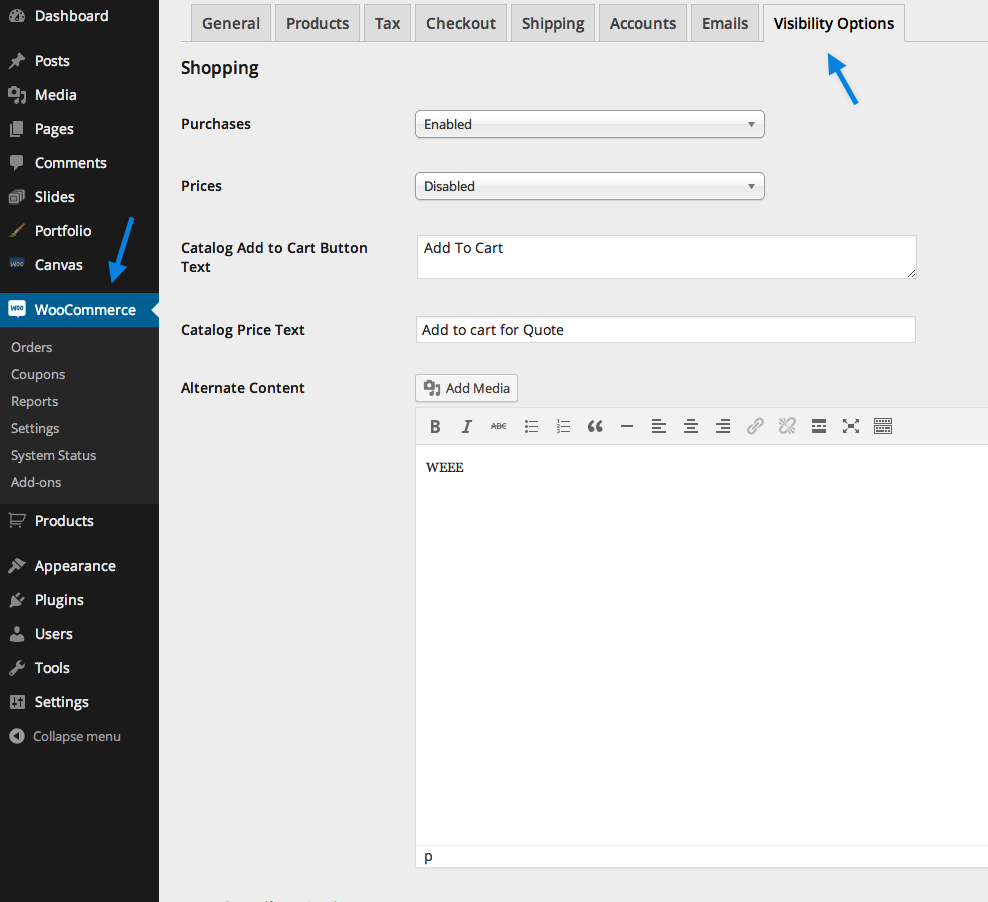 This section has several options.
Purchases:
This section has several options.
Purchases:
- Enabled – Purchases are allowed as expected.
- Disabled – Purchases are disabled for all users (whether they’re logged in or not). This setting disables all “Add to Cart” functionality. If you’d like to change the text used on the “Add to Cart” buttons, please refer to the section below entitled Catalog Add to Cart Button Text.
- Enabled for Logged In Users – This is similar to “Disabled” as described above except that the “Add to Cart” functionality will continue to work for logged in users.
- Enabled – Prices are displayed as expected.
- Disabled – Hides all prices, for all users, across the entire store on the front end. If you’d like to display a custom message or login form, please refer to the section below entitled Catalog Price Text.
- Enabled for Logged in Users – This is similar to “Disabled” as described above except that the prices will be visible for logged in users.
When prices are disabled, or enabled for logged in users only, all “Add to Cart” functionality is automatically disabled.
Catalog Add to Cart Button Text:
- Optional text to display in place of “Add to Cart” button when purchases are disabled entirely or when enabled for logged-in users only.
- Optional text to display in place of the price when prices are disabled, or enabled only for logged-in users.
Location Filter Options
↑ Back to top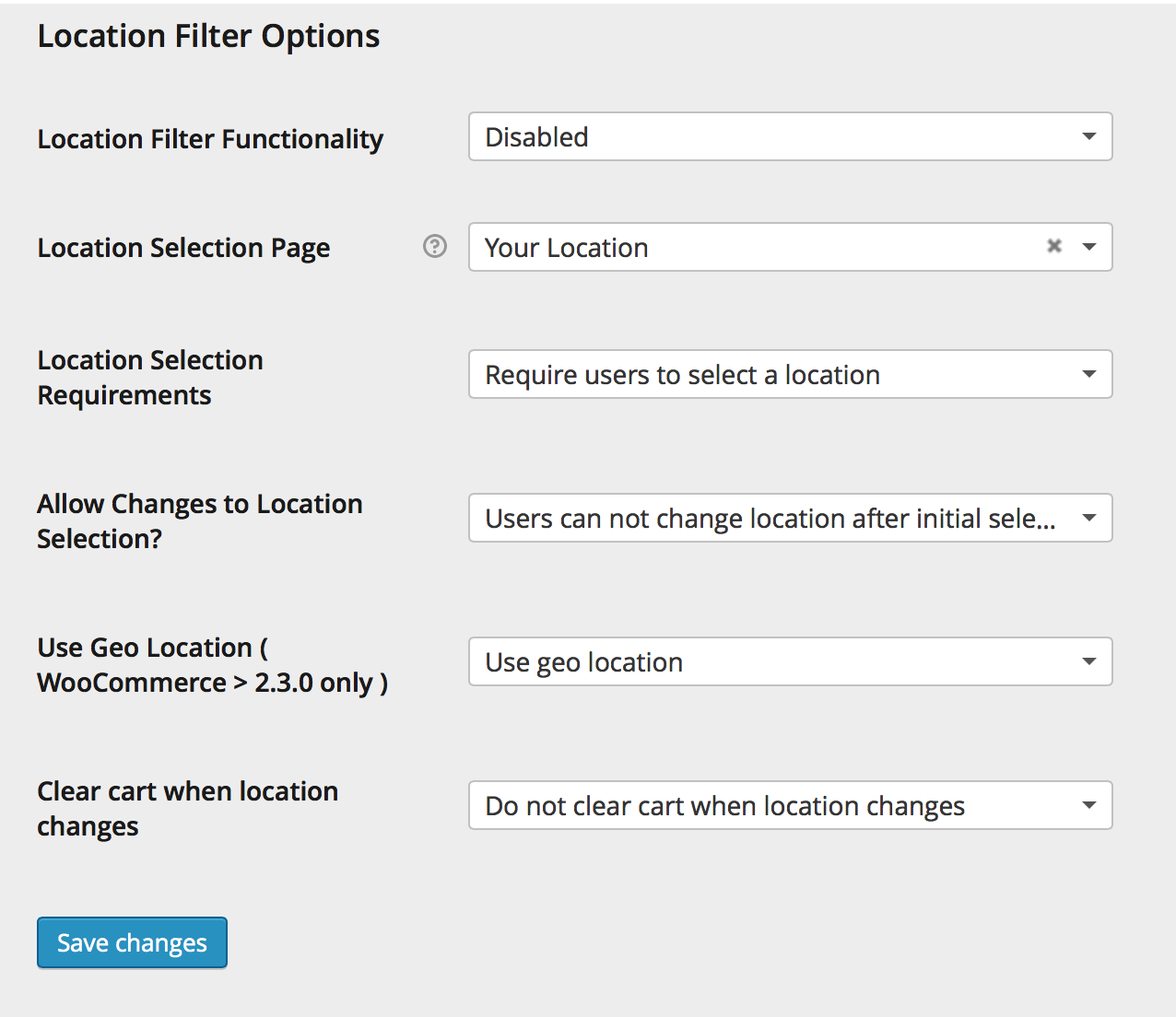 This section has several options.
Location Filter Functionality
This section has several options.
Location Filter Functionality
- Enabled – Geolocation is active and catalogue visibility will be based on the users location
- Disabled – Geolocation is inactive prices will be displayed as per normal
- Where users are able to set/change their location. The page is automatically added upon installation of the plugin and should contain the [location_picker] shortcode. Available countries are the same countries you enabled for WooCommerce under WooCommerce > Settings > General.
- Require users to select a location
- Location selection is optional
- Allow users to change location after selection
- Users cannot change location after initial selection
- Use geo location – Only relevant for WooCommerce versions newer than 2.3
- Do not use geo location – Used by default for the latest version of WooCommerce
- Clear cart when location changes
- Do not clear cart when location changes
Product Category Settings
↑ Back to top- Go to: WooCommerce > Products > Categories.
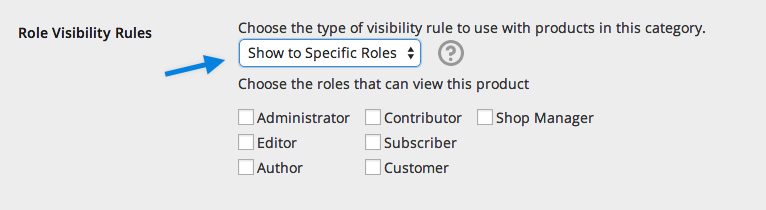
- Select Show to Specific Roles. Once selected, a new section appears, which allows you to tick the boxes of user roles that can see products in the category.
- Save changes.
Note: “Guest” is not a considered a role: These are regular users visiting your website that are not logged in. This plugin can hide for that role, but it isn’t meant to modify their capabilities beyond that.
Product Settings
↑ Back to top- Go to: WooCommerce > Products.
- Find the Restrictions tab in the Product Data metabox.
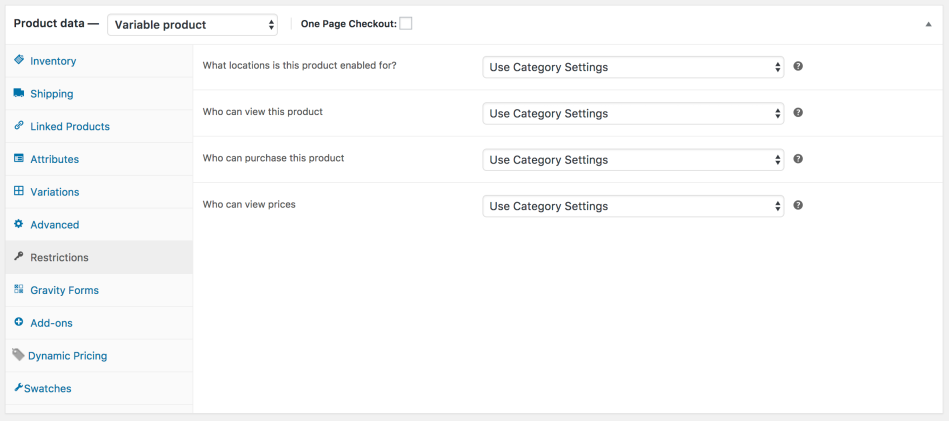
- Select for each option — Category, Everyone or Specific Roles:
- Who can view this product
- Who can purchase this product
- Who can view prices
- Category settings – Settings from the category will be applied to the product as assigned.
- Everyone
- Specific roles – Allows you to set which user roles can see this product.
Note: If product is assigned to multiple categories, the first category alphabetically will take precedence.

Shortcodes
↑ Back to top[woocommerce_logon_link]Register Link Used to automatically generate a link to your “My Account” page. To add this link to a page, post or product of your choice, use shortcode:
[woocommerce_register_link]Password Reset Used to automatically generate a link to your “Lost Password” page. To add this link to a page, post or product of your choice, use shortcode:
[woocommerce_forgot_password_link]Logon Form Displays a login form on a page, post or product of your choice. To add this, use shortcode:
[woocommerce_logon_form]
Useful Snippets
↑ Back to topNote: We are unable to provide support for customizations under our Support Policy. If you cannot get the code to work, consider purchasing the extension or contact a WooExpert.
Change the “Add to Cart” button text using a filter
↑ Back to topfilter catalog_visibility_alternate_add_to_cart_button to insert any content you require:
add_filter('catalog_visibility_alternate_add_to_cart_button', 'my_alternate_button', 10, 1);

function my_alternate_button($content) {
  return 'My Alternate Content';
}
Replace the price with custom HTML using a filter
↑ Back to topcatalog_visibility_alternate_price_html to insert any HTML you require:
add_filter('catalog_visibility_alternate_price_html', 'my_alternate_price_text', 10, 1);

function my_alternate_price_text($content) {
  return 'My Alternate Content';
}
FAQ
↑ Back to topWhy is my cart icon still in the navigation menu?
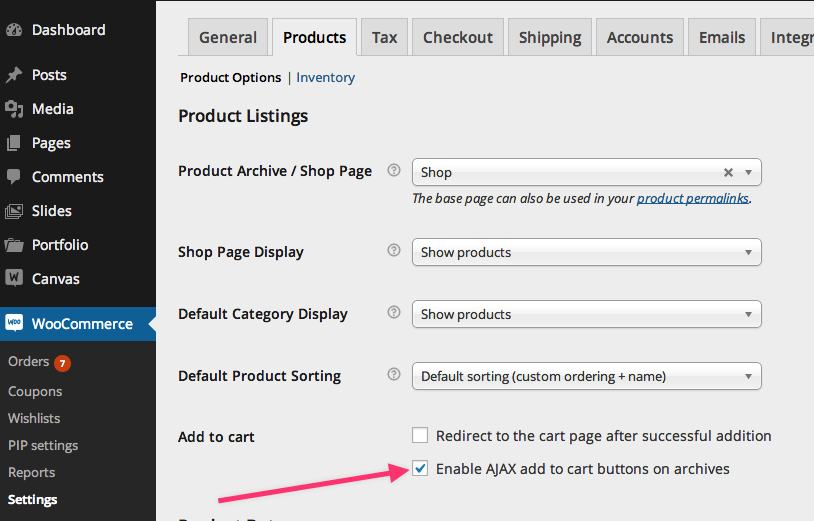
↑ Back to topWhy can people still add to cart on the main store page?
↑ Back to top- Example: If you add Read More as text to the button, AJAX still adds a product to the cart.